
SendSafely Halo for Salesforce Agentforce enables secure, end-to-end encrypted file collection by Salesforce's AI agents. With Halo, AI agents independently request sensitive files, customers securely upload without leaving the chat, and human agents seamlessly access the information they need to resolve cases faster without compromising security.
Key benefits of adding Halo to Agentforce include:
-
In-Chat Secure Uploads
Customers upload sensitive files directly in their Agentforce chat session. An intuitive upload button appears when the AI agent requests files, no new browser tab, no disruption.
-
End-to-End Encryption
Files are encrypted before they ever leave the user’s device and governed by the same enterprise-grade security policies customers rely on across SendSafely, including expiration controls, download restrictions, and audit logs.
-
Seamless Agent Handoff
Once uploaded, Halo automatically generates a secure link that’s posted back into the chat. When a human agent takes over they can access the files just like any other secure SendSafely upload using the Salesforce Agent App.
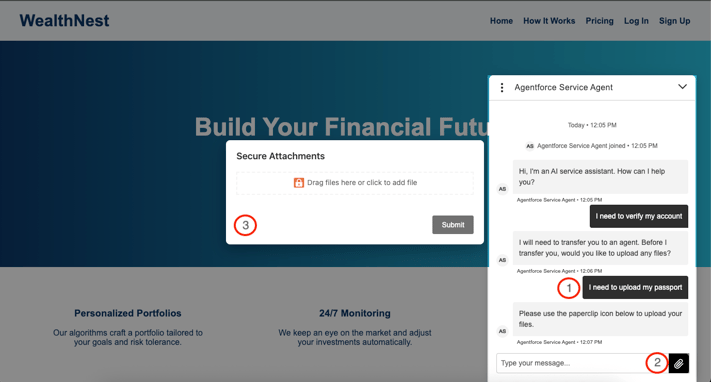
How it Works:
- Train Your AI Agent Trigger
Train your Agentforce bot to recognize when a customer will need to upload files. - Embed Halo Upload Logic
Include the Halo JavaScript modal on the page where your Agentforce chat widget lives. When the AI agent determines an upload is needed, Halo renders an upload button in the chat UI. - Upload and Security
Customers upload files via the embedded modal. Halo encrypts files end-to-end and posts a secure SendSafely link back into the chat. - Agent Access
Whether the conversation stays AI-only or requires a human agent, files are accessible via secure links viewed directly from the chat transcript or within Salesforce using the SendSafely Agent App.
By integrating Halo directly into Agentforce chat, support teams can:
- Close cases faster — attachments come in real time, without forcing customers out of the conversation.
- Reduce risk — sensitive content never touches Salesforce
- Improve satisfaction — fewer context switches and smoother experiences increase both NPS and first-contact resolution.
Start Using Halo with Agentforce
Check out our Help Center article for detailed instructions on configuring Halo with your Salesforce Agentforce chat widget. Have questions or want help building your integration? Contact our team at success@sendsafely.com, we’re here to help.
Halo is available on the SendSafely Enterprise plans. For more information, contact sales@sendsafely.com.
SendSafely: Integrated File Transfer for the Apps you Love
If you are looking for a secure way to send or receive files with anyone, or simply need a better way to transfer large files, our platform might be right for you.