
Security teams spend a lot of time hardening credentials, but stolen credentials are still one of the most common ways attackers get in. Today, we’re adding another layer of protection. IP Restrictions allow you to limit where your registered users can access SendSafely from, meaning your portal is only reachable from trusted networks like your office or VPN. Stolen credentials can’t be used from unknown locations. Hijacked sessions are shut down immediately if the source IP changes.
When enabled, SendSafely validates the source IP on every authenticated request. If the IP is not in your approved list, the request is blocked. For example, if a user’s IP changes mid-session (i.e., they disconnect from a VPN) that session is immediately denied. IP restrictions only apply to registered users. Guest users are unaffected, so secure file sharing with external parties continues uninterrupted.
IP Restrictions are enforced across every access path to SendSafely:
- Portal access (web sessions)
- Login attempts
- Third-party integrations (Zendesk, Salesforce, Outlook etc.)
- REST API usage
- SCIM API access
Configuring IP Restrictions
Admin users manage the Allowed IP range from the Enterprise Console, Configuration section. From here, admins can:
- Enable or disable IP Restrictions
- Add one or more IP ranges using standard CIDR notation
- View, delete, and update existing IP ranges
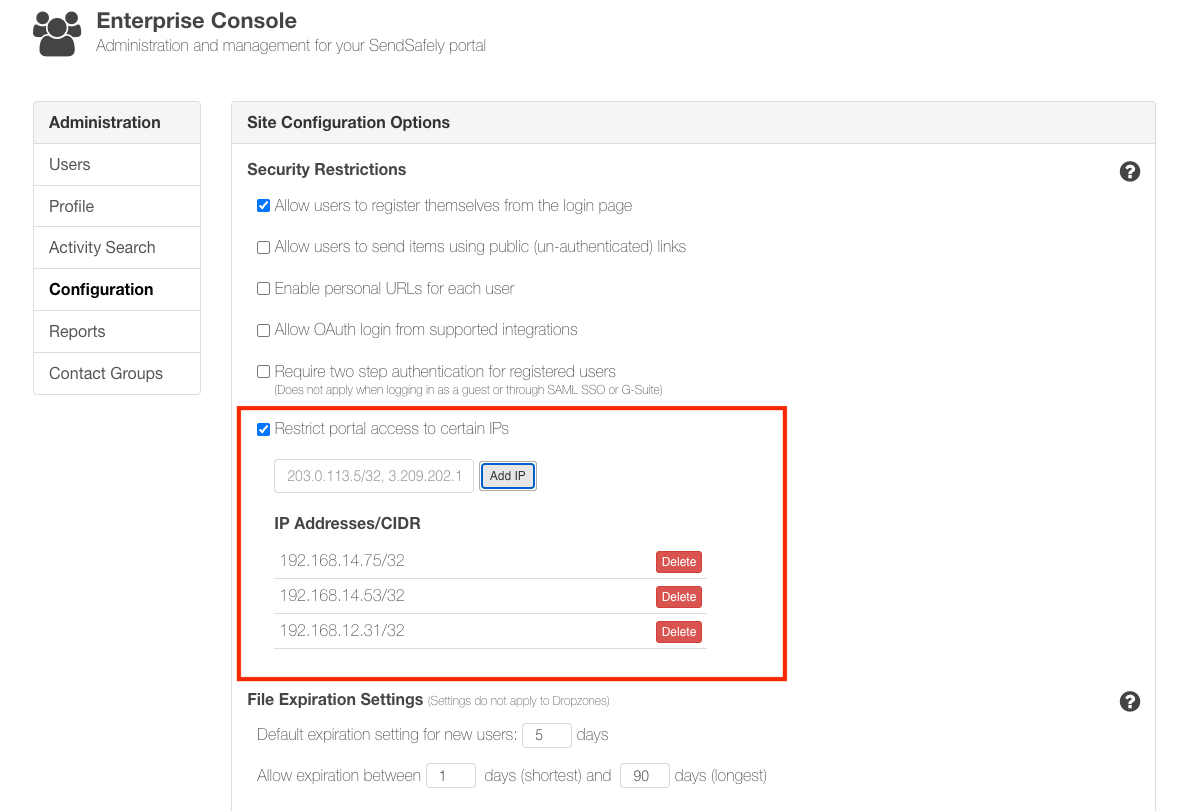
IP Restrictions give security teams tighter control over where SendSafely can be accessed. If you’d like help configuring IP Restrictions or have questions about best practices, our support team is always happy to help.
IP Restrictions are available on the SendSafely Enterprise plan. For more information, contact success@sendsafely.com.
SendSafely: Integrated File Transfer for the Apps you Love
If you are looking for a secure way to send or receive files with anyone, or simply need a better way to transfer large files, our platform might be right for you.