
Workspace collaboration works best when everyone stays in sync, but until now, notification settings were entirely up to each individual user. We’re excited to announce new capabilities for Workspace Notifications, a much-requested feature update that gives Workspace Owners and Managers the ability to configure email notification settings on behalf of their collaborators.
Workspace Owners and Managers can now set how often collaborators receive email updates about new file uploads and file updates. The available notification frequencies include:
- Never (no email notifications are sent - the default setting)
- Daily (a summary of updates is sent at the end of the day)
- Immediately (an email is sent for every new file update)
Easy to Manage from the Collaborators Tab
Notification settings are managed from the Collaborators tab within the Workspace. Workspace Owners and Managers can:
- Set notification preferences when adding new collaborators
- Update notification settings for existing collaborators
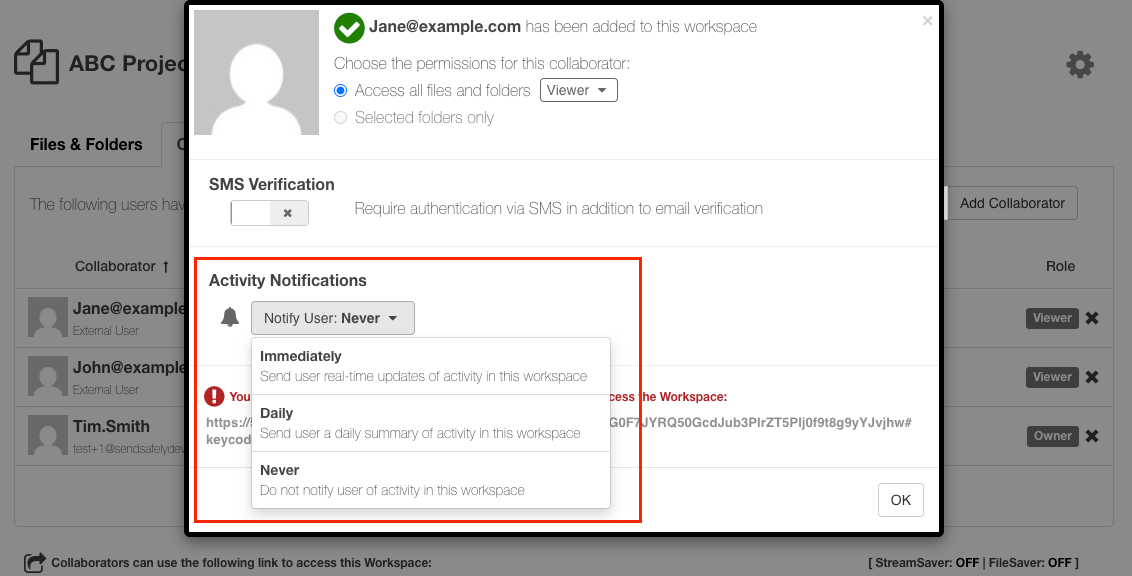
When a notification setting is updated, the collaborator will receive an email informing them of the change. When adding new collaborators, be sure to share the secure Workspace link promptly. That way, they’ll have access to the Workspace right away, along with the notifications configured for them.
Note that collaborators who are limited to subfolder-only access are not eligible to receive Workspace notifications.
Workspace Notifications give teams better visibility into file activity with less manual follow-up. If you have feedback or ideas for future Workspace improvements, we’d love to hear from you.
SendSafely Workspaces are available on the SendSafely Teams, Business and Enterprise plans. For more information, contact success@sendsafely.com.
SendSafely: Integrated File Transfer for the Apps you Love
If you are looking for a secure way to send or receive files with anyone, or simply need a better way to transfer large files, our platform might be right for you.