
SendSafely's Model Context Protocol (MCP) server gives AI assistants access to SendSafely's end-to-end encrypted file transfer platform while maintaining the security controls your organization depends on. Once installed, the AI can send packages, manage recipients, upload/download files, administer workspaces, and query activity logs through natural language.
What Is the SendSafely MCP Server?
The Model Context Protocol is an open standard that lets AI assistants interact with external services through a secure, well-defined interface. SendSafely's MCP server exposes the key functions of the SendSafely platform to compliant AI tools. With the MCP you can send encrypted packages, manage recipients, monitor activity, and administer workspaces within your AI-assisted workflow.
Sending Encrypted Packages
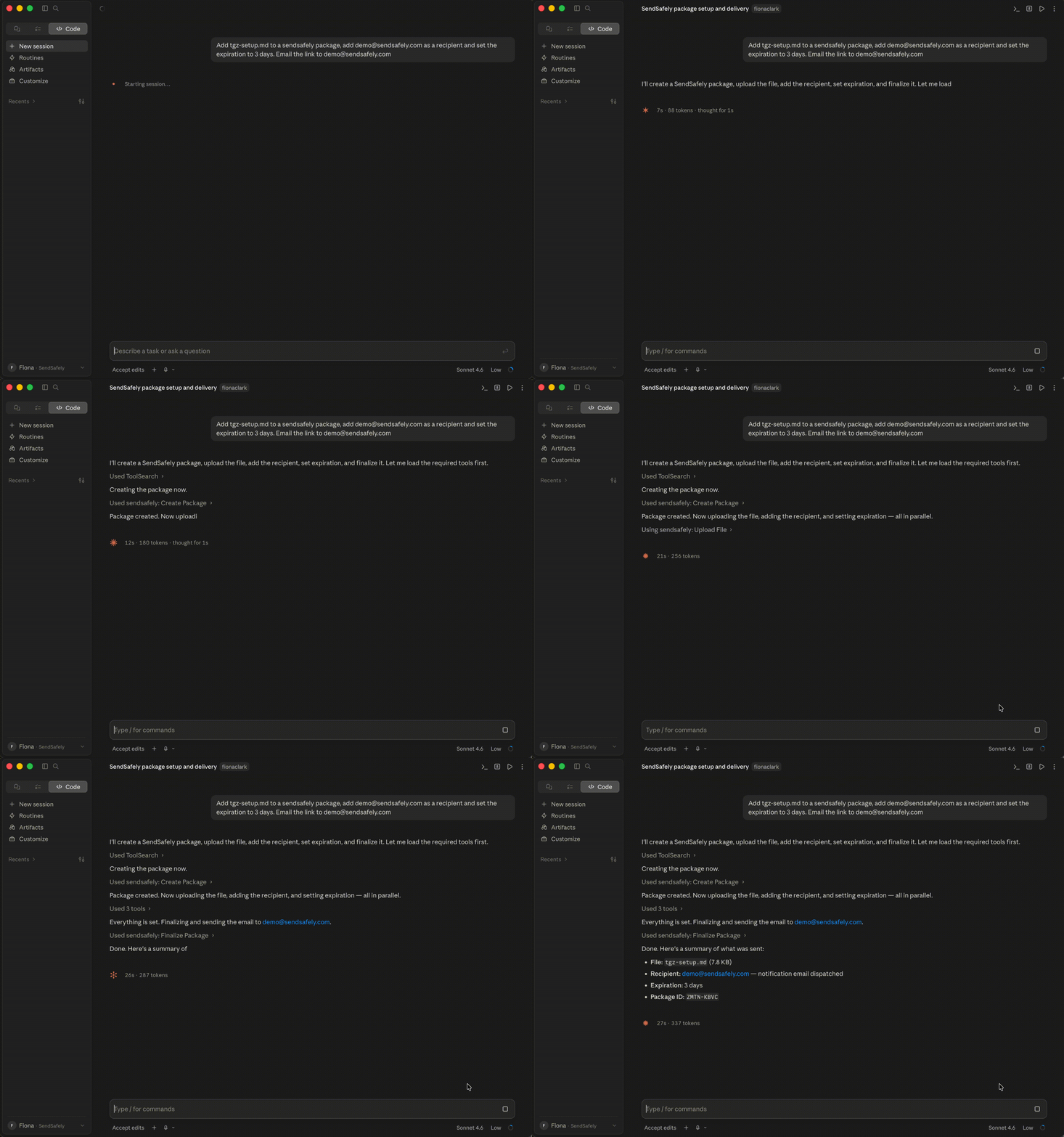
One of the most powerful capabilities is orchestrating an encrypted send entirely through AI. Your agent can:
- Create a package
- Add recipients — Specify who can access it, with your choice of authentication method.
- Upload files — Attach one or more files
- Configure security settings — Set expiration date, add watermarking or limit the number of times the package can be accessed.
- Finalize — Seal and deliver the package. A secure link is generated and can be returned to the user or automatically emailed to the recipient.
Receiving Packages
The MCP server also supports the receiving packages, which is great for inbound workflows, such as monitoring a Dropzone. You can retrieve received packages, download files, and read file contents directly. Elicitation is used to confirm you authorize the AI agent to read a file's content (vs downloading) every time you prompt the AI agent to do so.
Authorized Agents can be set up as a SendSafely Trusted Device to make reviewing packages without the secure link fast and convenient.
Workspace Management
For teams that need persistent, organized file storage rather than one-off transfers, SendSafely Workspaces are fully supported. Through the MCP you can:
- Create and manage Workspaces and collaborators
- Upload and download files
- Organize files into directories
- Move, rename, and delete files and directories
- Pull activity logs per workspace
This makes it practical to manage ongoing data rooms, vendor exchange folders, or internal secure storage with the same AI-assisted interface.
Activity Logs and Auditability
Security teams will appreciate that the MCP exposes activity logs for packages and workspaces. You can query recipient activity programmatically, useful for compliance workflows, automated audit trails, or alerting when a sensitive package hasn't been opened within a defined window.
Trust Boundary for Decrypted Content
Integrating AI into sensitive workflows always carries risk .The SendSafely MCP server is built around the same encryption and access control guarantees as the rest of the platform. Your data doesn't leave the SendSafely trust boundary, and by default the AI assistant acts as an orchestration layer, not a data handler. The MCP enforces a human-in-the-loop authorization step before the AI can access decrypted file contents.
Getting Started
The SendSafely MCP server is currently in Beta and is available for use with any MCP-compatible AI client. For access to the Local MCP Server, please reach out to your SendSafely Account Manager. For more information on installing and using the MCP, please refer to below Help center articles
For more information, contact success@sendsafely.com.
SendSafely: Integrated File Transfer for the Apps you Love
If you are looking for a secure way to send or receive files with anyone, or simply need a better way to transfer large files, our platform might be right for you.